Author: Tim Elliott

  • On-Page SEO Checklist for New UK Business Websites

    On-Page SEO Checklist for New UK Business Websites

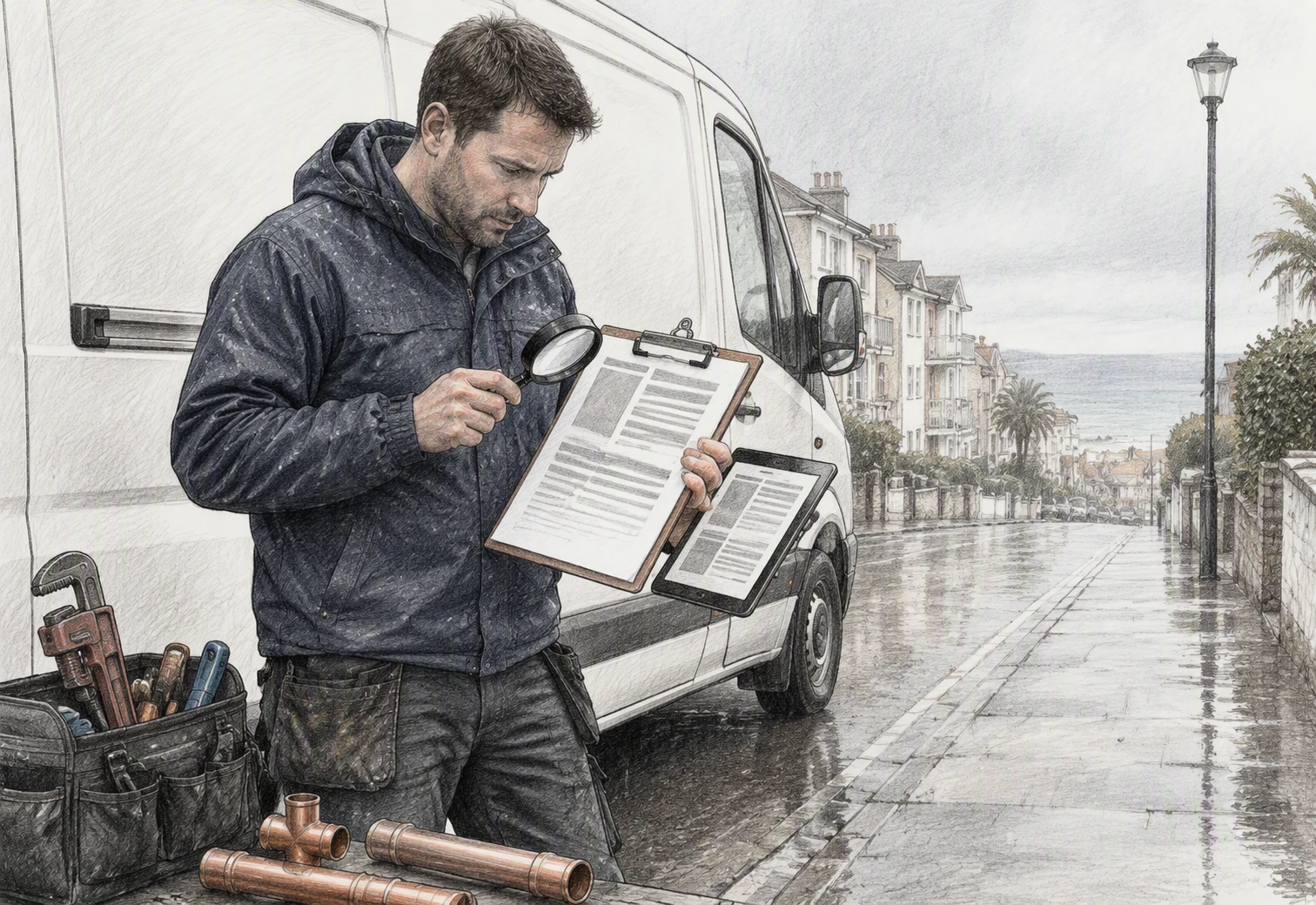
    Quick Summary: A UK business website can look professional but still fail to attract local searches if it doesn’t clearly signal services and locations-like an electrician in Leeds missing the term ’emergency electrician.’ The checklist forces each page to focus on one specific search intent, such as pairing a service (e.g., ’emergency plumber’) with a location (e.g., ‘Bournemouth’) in the title, H1, and meta description. It also demands proof-real reviews, job photos, and service areas-to build trust, and ensures contact details are instantly accessible on mobile. Google’s own guidelines back this approach, but results take months unless pages are regularly updated based on actual customer searches.

    A new electrician’s site can look smart but still miss searches for an emergency electrician in Leeds. The title, headings, and contact route may not show Google what the business does or where it works. This on-page SEO checklist fixes those gaps. It shows the page-by-page details that drive local searches and enquiries. Built for UK start-ups and small firms, it makes on-page SEO clear, practical, and ready to use.

    Step 1: Give Every Important Page One Clear Search Job

    Map Services, Products and Areas to Separate Pages

    Give each page one job: match one customer need. Google advises a logical site structure so users and search engines can understand how pages relate (Google’s SEO Starter Guide).

    What customers seek Page to create Example
    Core service Service page Emergency plumber
    Product range Product category page Handmade candles
    Real service area Area page Plumber in Bournemouth
    Flowchart linking plumbing services products areas
    Flowchart linking plumbing services products areas
    1. List every service, product and area you genuinely cover.
    2. Combine close phrases with the same intent on one page.
    3. Create a new page only where the offer or area changes.

    Do not make thin pages that only swap town names. Add real local proof, such as jobs completed, service details and travel times.

    • Link service pages to relevant area pages.
    • Keep your homepage focused on your main offer and location.

    Also Read: https://webdon.co.uk/care-plans.html

    Step 2: Optimise the Page Signals Customers See in Search

    Run the Title, H1 and Description Check

    Make your title tag, H1 and meta description tell the same clear story. Google may use headings and other page text to form its result title, so keep the main promise aligned with the page content, as Google explains.

    Signal What to check
    Title Name the service and place: “Emergency Plumber in Bournemouth”
    H1 Match the title’s meaning, not necessarily every word
    Description State the offer, area and next step in one natural sentence
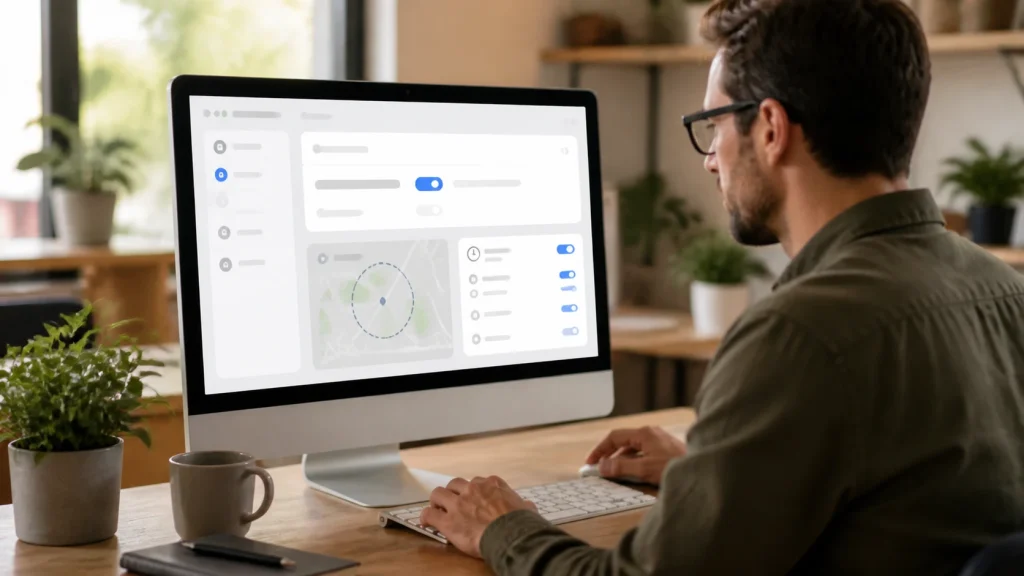
    Dorset plumber checking search preview on laptop
    Dorset plumber checking search preview on laptop
    1. Give every key page a unique title and H1.
    2. Put the service and town near the start.
    3. Write a description that answers, “Why choose us?”

    Avoid repeating keywords. Google says descriptions should be specific and useful, not a list of search terms. Read its guidance

    Also Read: https://webdon.co.uk/blog.html

    Step 3: Make the Page Useful, Local and Evidence-Based

    Show Why a Customer Should Choose You

    Give visitors proof, not vague claims. Google advises pages to show first-hand knowledge, clear sourcing, and information that helps people act, not just rank. See its people-first content guidance.

    Add details that a local customer can check:

    • The towns you cover, such as Poole, Bournemouth, or Dorchester
    • Real job photos with a short caption
    • Reviews, case studies, qualifications, and years trading
    • Clear prices, lead times, or what happens after an enquiry
    Weak claim Stronger evidence
    “Quality plumbing” “Gas Safe plumber serving Poole, with same-week appointments”
    “Great local service” “Rated 4.9/5 from 38 verified customer reviews”

    Never invent reviews, accreditations, or service areas. One honest proof point beats a page full of sales talk.

    Also Read: https://webdon.co.uk/about.html

    Step 4: Connect the Page to Enquiries and Check It Before Launch

    Complete the Five-Minute Enquiry Test

    Open the page on your phone and act like a new customer.

    1. Find the call, email, or enquiry button within seconds.
    2. Submit the form using a test email address.
    3. Check the confirmation message is clear and tells them what happens next.
    4. Confirm the enquiry reaches the right inbox.
    5. Tab through buttons and form fields without a mouse.
    Check Pass condition
    Contact link Opens the right phone, email, or form action
    Form Required fields work and errors explain the fix
    Mobile view Text and buttons stay easy to use

    GOV.UK checks core pages, contact pages, and forms, including keyboard access, in its website testing approach.
    Homepage
    Homepage

    Ready to launch with stronger local search basics? WebDon builds affordable, done-for-you websites that help Dorset businesses get found and win enquiries.

    Frequently Asked Questions

    Q1: Best SEO help for getting more enquiries?

    Start with service pages, clear local terms, strong page titles, and one obvious contact action. WebDon can help set these foundations during a new website build.

    Q2: Should every page target a different keyword?

    Yes. Give each key page one clear search phrase that matches its purpose. Avoid making several pages compete for the same service and location.

    Q3: How soon will on-page SEO bring leads?

    Some pages may gain visits within weeks, but steady results often take several months. Keep improving pages based on real customer questions.

    Conclusion

    Give each key page one clear purpose, a useful title, plain headings, local detail and relevant links. Google’s guidance supports this people-first approach. Check pages after launch and fix gaps as you find them.
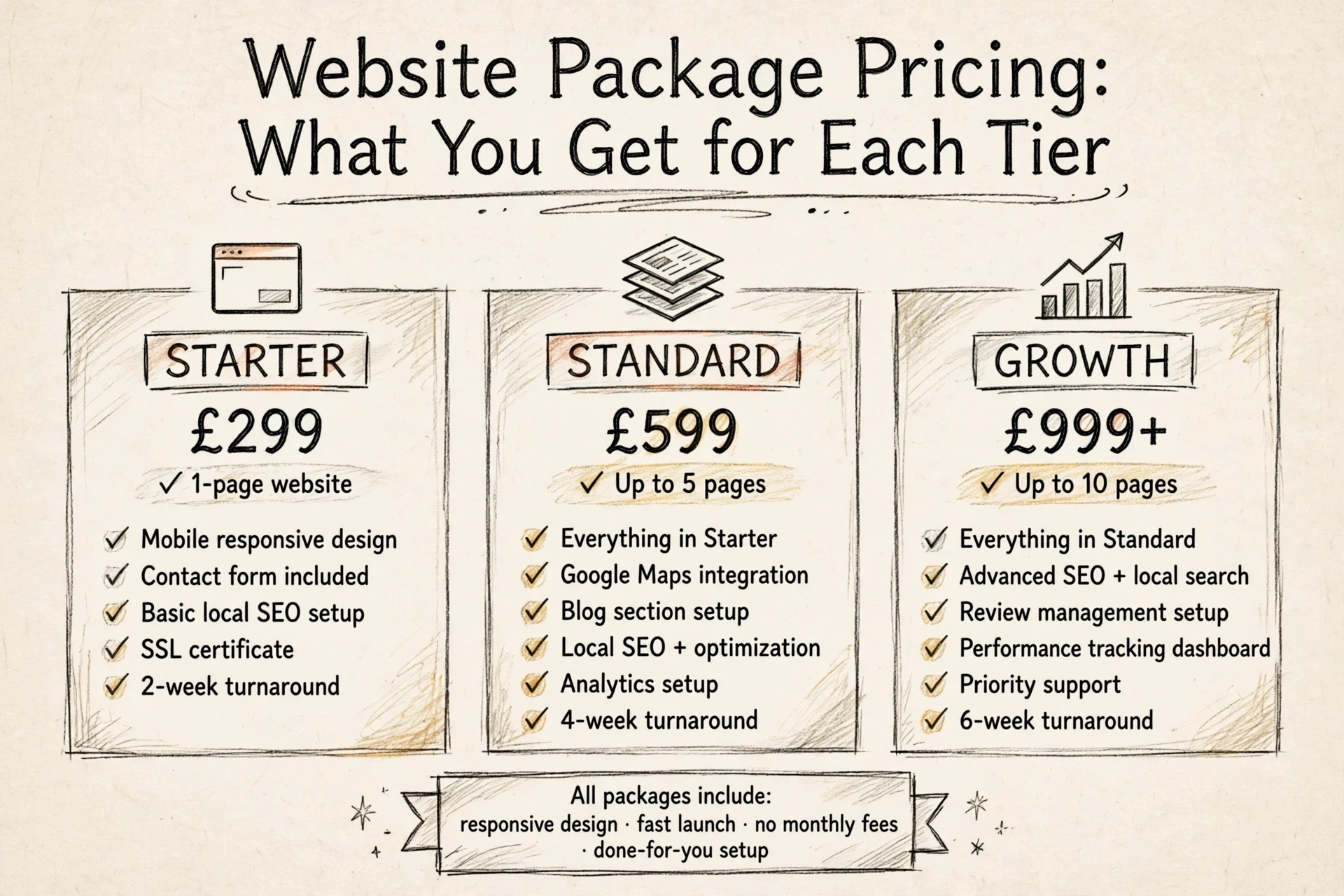

  • Website Package Pricing: What You Get for Each Tier

    Website Package Pricing: What You Get for Each Tier

    Quick Summary: Website package pricing only makes sense when you compare what each tier actually includes, not just the headline fee. The guide breaks down typical tiers – Starter for basic presence, Business for growing enquiries, and Specialist for selling or booking – and stresses checking scope, ownership, and support before committing. It advises matching the tier to your business goal, not your budget, and always asking for the total first-year cost including hosting and domain. Fixed-price providers like WebDon build done-for-you sites for local customers, so you know the full cost upfront and can upgrade later.

    A Dorset electrician gets two quotes, both called a small-business package. One buys a simple five-page site. The other adds booking tools and monthly edits. Website package pricing only makes sense once you know what each tier includes. This guide breaks down typical tiers, so website package pricing becomes a fair comparison instead of a guessing game. As a Dorset web design team offering fixed-price packages, we’ll show you exactly what to check before you commit.

    What Website Package Pricing Usually Covers

    Separate the Build from the Running Costs

    A website package price usually covers the build itself: design, page setup, mobile-friendly layout, basic SEO, and content placement. What it often leaves out is the running cost. Most sites need hosting, a domain name, an SSL certificate, and sometimes email. Some builders bundle these in; others bill them yearly on top.

    Ask for a two-line breakdown: one-off build fee, then monthly or annual running costs. This matters for fixed-price packages like ours at WebDon – knowing the full first-year total stops surprises and makes quotes easier to compare fairly.

    Also Read: About WebDon · Dorset Web Design from a Print Studio

    How Starter, Business, and Specialist Tiers Differ

    Each tier matches a different stage of business. Starter gets you online, Business helps you grow enquiries, and Specialist handles selling, booking, or bespoke features.

    Get the Essentials Online

    Starter packages suit new or small businesses that need a clean, credible presence quickly. Expect a handful of pages: home, services, about, and contact, plus your Google Business Profile set up properly. A Dorset builder or market stall holder doesn’t need months of work to get a simple, professional site live.

    Support More Services and Enquiries

    Business packages fit growing firms with more to say. You get extra pages for each service or location, stronger local SEO so nearby customers find you, enquiry forms, and copywriting help. Firms offering several trades under one roof, or shops with seasonal offers, get the room they need.

    Add Selling, Booking, or Custom Functions

    Specialist packages handle websites that must do things. That means online shops, appointment booking, membership areas, or custom tools built around your workflow. A hairdresser taking bookings, or a vendor selling at events, gets a site that works hard behind the scenes.

    A tradesperson and web designer compare website tiers on a tablet in a workshop
    A tradesperson and web designer compare website tiers on a tablet in a workshop

    Also Read: Dorset Web Design vs DIY Builders: Which Suits Startups?

    Compare Fixed-Price Offers on More Than the Headline Fee

    Two quotes can differ by hundreds of pounds and still be almost identical. Look past the price and compare what each offer actually includes.

    Check Scope, Ownership, and Support

    Ask every provider the same three questions. First, scope: how many pages, and who writes the text and supplies photos? Second, ownership: the site, domain, and content should belong to you, not the designer. Third, support: what happens after launch, and what do updates cost? A cheaper quote that answers all three well often beats a pricier one that doesn’t.

    Small business owner comparing website quotes at table
    Small business owner comparing website quotes at table

    Choose for the Business Job, Not the Biggest Tier

    Buy the package that fits the job your website must do. A plumber needs a clear service list, prices, and a phone number that stands out. A market stall selling online needs a shop instead of extra pages. Fixed-price providers like WebDon build for exactly this: a done-for-you site aimed at attracting local customers. Paying for a bigger tier you won’t use just slows the launch down.

    Also Read: New Google Business Trends for 2026: What Matters Now

    Choose the Right Tier and Plan Your Next Step

    Match the tier to your goal, not your budget. A tradesperson needing calls can start small. A shop selling online needs the mid or top package.

    Before you commit, check each package for:

    • Total first-year cost, not just the build price
    • Who owns the site and its content
    • Update costs after launch
    • Local SEO included or extra

    WebDon offers fixed-price packages for Dorset businesses, so you know the full cost upfront.

    Pick the tier that solves today’s problem. You can always upgrade later.

    Ready to compare? List your must-haves, then ask two or three providers for written quotes.

    Homepage
    Homepage

    Ready to pick a package? WebDon offers fixed-price website packages with the full cost agreed upfront. See what each includes at WebDon.

    Frequently Asked Questions

    Q1: Who offers the best fixed-price website package?

    Look for clear pricing, local SEO included, and a realistic launch plan. WebDon offers fixed-price packages built for Dorset small businesses, so you know the full cost before you start.

    Q2: What should a basic website package include?

    At minimum: a mobile-friendly design, contact page, Google Business setup, and basic local SEO. If a cheap package skips these, it won’t bring you customers.

    Q3: How much should a small business website cost in the UK?

    It depends on scope: a simple brochure site costs far less than one with booking or shop features. Always compare what’s included, not just the headline price.

    Q4: Can I upgrade my package later?

    Most providers allow this. Ask upfront whether extra pages, online booking, or an online shop can be added later without rebuilding the site from scratch.

    Conclusion

    The right package matches your actual needs, not the biggest page count. Compare what each tier includes, check the total cost, and pick the fixed-price option that gets your business online without fuss.

  • New Google Business Trends for 2026: What Matters Now

    New Google Business Trends for 2026: What Matters Now

    Quick Summary: Google’s 2026 review policies now strictly prohibit businesses from setting review targets, asking for specific content, or offering incentives. Fake or policy-violating reviews are aggressively removed, making honest, neutral requests essential. Businesses should focus on genuine customer feedback, keep their profiles accurate, and avoid old review tactics to protect their visibility and trust.
    Google’s 2026 review changes are already shifting what UK firms can safely ask for on a Google Business Profile. A sloppy review push can cost you reviews, trigger filtering, and weaken your Google Business Profile in Maps when buyers are ready to call. I track local search changes closely, and this piece focuses on what Google seems to enforce now, plus the practical steps to protect your Google Business Profile.

    What Google Changed in 2026 and Why It Matters

    The two review practices Google now flags

    Google made two points much clearer in 2026. You cannot set staff review quotas, and you cannot ask customers to include specific content like an employee name in their review, as shown in Google’s Maps policy.

    • No targets like “get 5 reviews this week”
    • No scripts like “please mention Dave by name”
    • No rewards, discounts, or freebies for reviews

    Google still allows you to ask for a review. It does not allow you to shape the words or pressure the outcome.

    Why this hits local businesses hard

    This matters because Google is enforcing review quality more aggressively. In 2025, Google says it blocked or removed over 292 million policy-violating reviews on Maps, and new protections now pause reviews on suspicious profiles and warn owners by email, according to Google’s April 2026 update.

    • Fewer reviews can mean less trust
    • Lost reviews can hurt calls and walk-ins
    • Old “review tactics” now carry real risk

    Also Read: https://webdon.co.uk/about.html

    What to Stop Doing on Your Google Business Profile Right Now

    Safer ways to ask for reviews

    Ask every real customer the same way, after the job or visit ends. Google says merchants can request honest reviews, but not shape the rating or wording in the Maps content policy.

    1. Send a plain SMS or email
    2. Ask for honest feedback
    3. Use the same message for everyone

    Keep it neutral. No pressure, no scripts, no rewards.

    Tradesperson sending review request from tidy van
    Tradesperson sending review request from tidy van

    Common review mistakes to avoid

    Stop doing these now:

    • Offering discounts, freebies, or refunds for reviews
    • Asking only happy customers
    • Telling people to mention a staff member by name
    • Running staff review quotas
    • Pushing reviews while customers are still on site

    Google also said in April 2026 it may pause new reviews and show alerts when spam patterns appear on profiles in its Maps safety update.

    Stop Do instead
    Incentives Neutral ask
    Review gating Ask everyone
    Staff-name prompts Open-ended request

    What this means for Dorset and other local service businesses

    For plumbers, cleaners, cafés, salons, and market traders, old review hacks now carry more risk. If you rely on local calls and walk-ins, clean up your process fast. A simple, fair review ask is safer than chasing five-star volume.

    Also Read: https://webdon.co.uk/contact.html

    How to Protect and Improve Your Profile After the Update

    Keep your profile tight. Google says your name, address, hours, category, and service area must match the real business and stay consistent across your branding and listing Google’s business guidelines. Check these first:

    • business name
    • opening hours
    • phone number
    • service area
    • main category

    If you have changed premises, hours, or services, update Google first, then your website.

    Shop owner updating business details on desktop dashboard
    Shop owner updating business details on desktop dashboard

    Make review replies earn trust. Google says replies are reviewed before posting and must follow policy Google review help.

    1. Reply fast
    2. Thank the customer
    3. Mention the job or visit
    4. Avoid salesy language
    5. Flag policy-breaking reviews instead of arguing

    Use the profile to help people act. Add clear services, booking options, and fresh photos so more searchers call, message, or visit, not just see your ranking.

    Also Read: https://webdon.co.uk/blog.html

    Why Google Is Tightening the Rules

    Google is pushing hard for real, unbiased reviews because fake ratings hurt both shoppers and honest local firms. In its 2026 Maps update, Google said users posted over 1 billion reviews in 2025, while its systems blocked or removed 292 million policy-breaking reviews and 13 million fake Business Profiles according to Google. Google’s own Business Profile help page also says reviews must break policy before removal, not just because a business dislikes them see Google’s guidance. > That tells you the goal is trust, not softer moderation.

    Homepage
    Homepage

    Need a website that supports your Google Business visibility in 2026? WebDon builds affordable, fast-launch sites made to help local customers find and trust you.

    Frequently Asked Questions

    Q1: Top Google Business optimisers in Dorset?

    Start with firms that build for local search, not just pretty pages. WebDon fits small Dorset firms well because it pairs fast website launches with local visibility. Also compare service scope, review support, and GBP upkeep before choosing.

    Q2: Can Google remove old reviews in 2026?

    Yes, if they break policy or look fake, copied, paid, or off-topic. Age does not protect a review. Keep records of real jobs, invoices, and messages so you can challenge removals or report suspicious reviews fast.

    Q3: What should I do if reviews suddenly disappear?

    Check your Google Business Profile status first. Then review recent customer activity, policy risks, and duplicate listings. Ask real customers to avoid vague, one-line spammy posts. If needed, document the drop and contact support with clear evidence.

    Q4: Are review requests still safe for small businesses?

    Yes, if you ask all customers fairly and do not offer rewards, pressure, or filters. Use simple timing: after the job, sale, or visit. Ask once, make it easy, and never steer only happy customers to Google.

    Conclusion

    Google now expects real, unguided reviews and tougher enforcement. UK firms should avoid incentives, quotas, and scripted asks, while watching for policy breaches flagged by Google Business Profile rules and the CMA’s 2025 action.

  • Dorset Web Design vs DIY Builders: Which Suits Startups?

    Dorset Web Design vs DIY Builders: Which Suits Startups?

    Quick Summary: For startups, DIY builders like Wix work only for testing ideas on a sub-£500 budget, but a professional Dorset designer wins when the site must bring in customers. DIY hides real costs in 20-60 hours of your time and locked SEO settings, while fixed-price services like WebDon (£350-£1,200) include local SEO and ownership. The honest test: if one lost customer per month costs more than a professional site, DIY is the expensive option.

    Testing a first offer? A DIY builder gets you online fast. Want a distinctive, locally found site without losing evenings? Hire a designer. This guide compares website design routes by cost, effort and visibility, covers Dorset web design pricing and web designer costs, and gives you a simple decision rule.

    Dorset Web Design vs DIY Builders: At a Glance

    Professional Dorset web designer DIY website builder
    Upfront cost WebDon lists £350 for one page, £700 for up to five pages, and larger projects from £1,200. Can start free; paid features require a plan.
    Ongoing costs An outright-build option has no monthly WebDon fee; hosted care is optional. Plan renewals and any selected domain, app, email, or transaction costs.
    Time and effort Designer handles the build; the business supplies core information and materials. Owner builds, writes, checks, and maintains the site.
    Design and control Custom-built site; WebDon states clients own the site after payment. Templates and editor offer flexibility within the platform.
    Local SEO and support Local SEO is included; ongoing hosting and support options are available. Built-in SEO tools and platform support; local strategy remains the owner’s responsibility.

    How Professional Dorset web designer and DIY website builder Compare

    Professional Dorset web designer

    A done-for-you service like WebDon handles the whole website design for Dorset businesses, with fixed prices from £350 to £1,200 and local SEO built in. You supply the basics; they build the site, which you own after payment.

    Professional Dorset web designer
    Professional Dorset web designer

    Key strengths

    • Fixed, published pricing with no surprise invoices
    • Custom build, local SEO included, no monthly fee on outright builds

    DIY website builder

    A self-service platform where you pick a template, drag and drop, and publish yourself, often free to start. It suits hands-on owners with time to write, check, and maintain everything.

    DIY website builder
    DIY website builder

    Key strengths

    • Low entry cost with templates and AI tools
    • Full control inside the platform, at your own pace

    What Do You Get for the Cost?

    Compare the Full First-Year Cost

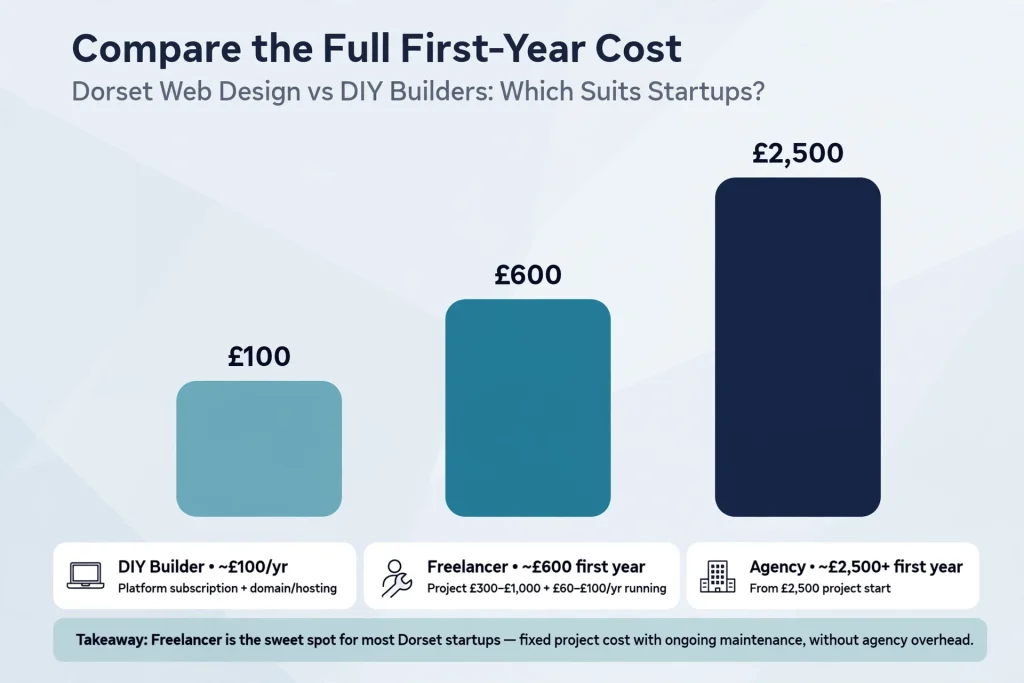
    The sticker price hides the real one. A DIY builder like Wix or Squarespace looks cheap at £150-£400 a year, but add your domain, business email, and 20-40 hours of your own time and it climbs fast. A professional website design from a UK freelancer or local studio usually runs £300-£1,000 one-off, then about £60-£100 a year to run. Agencies start near £2,500. The sweet spot for most Dorset startups sits in that middle band: done-for-you work at a fixed price, without agency overhead.

    First-year cost comparison bar chart for Dorset web design options
    First-year cost comparison bar chart for Dorset web design options

    UK cost guide

    Time, Design, and Day-to-Day Control

    DIY looks free until you count the hours. A first-time business site on Wix or Squarespace takes 20 to 60 hours to build, plus a couple of hours a month on updates and fixes. That’s evenings and weekends you don’t spend on customers.

    Design is the other trade-off. Templates work, but they look like templates, and customising them past the demo stage is fiddly. Wix also won’t let you switch templates later without a rebuild.

    Done-for-you services like WebDon flip the model: you spend an hour or two providing details, they handle design, hosting, and updates. DIY wins on control; professionals win on time and polish.

    Also Read: About WebDon · Dorset Web Design from a Print Studio

    Local Visibility, Ownership, and Future Growth

    Getting found by locals matters more than looks. A professionally built site pairs proper local SEO with a Google Business Profile, so you appear when someone searches “plumber near Weymouth”. DIY builders give you basic SEO tools, but settings that affect rankings often stay locked.

    Ownership is the other trap. Some designers register your domain in their own name, and UK law can leave the agency holding copyright unless your contract says otherwise, as guidance on website ownership explains. Ask three questions before signing: who owns the domain, who holds the files, and can you leave freely.

    For growth, pick a provider that scales with you, like WebDon’s fixed-price packages, rather than a platform that forces a rebuild later.

    Also Read: WebDon Journal · Getting Your Dorset Business Online

    Which Should a Startup Choose: a Dorset Designer or DIY Builder?

    Ask three questions: does your site need to win customers, do you have 20-40 spare hours, and will you want to grow? If the site must bring in leads, a Dorset designer wins. Local firms like WebDon build fast, search-ready sites at fixed prices, and one owner-run comparison notes most founders spend whole working weeks on DIY platforms, often with poor results.

    Choose DIY if you’re testing an idea on a sub-£500 budget and your site is just a digital business card.

    The honest test: if one lost customer per month costs more than a professional site, DIY is the expensive option.

    Homepage
    Homepage

    Still weighing it up? Skip the DIY learning curve and let WebDon build you a fast, fixed-price site that wins local customers.

    Frequently Asked Questions

    Q1: What are the key differences between a professional web designer and a DIY website builder?

    A designer handles setup, SEO and design for you; DIY means you build and maintain it yourself, saving cash but spending time.

    Q2: How much does a professional website cost for a startup in the UK?

    Most startups pay £300-£1,500 for a fixed-price site. WebDon offers affordable Dorset packages without agency fees.

    Q3: What are the hidden costs of using DIY website builders?

    Expect add-ons for plugins, ecommerce, email and domain, plus your own hours. Fees rise as your site grows.

    Conclusion

    DIY builders suit test ideas and tight budgets; professional design wins when your site must bring in customers. Dorset startups should weigh time, risk, and growth – and with 78% of UK businesses now online, a site that works matters more than one that’s cheap (Whito).

  • Affordable Web Design Quotes: What Should a Fair Price Include?

    Affordable Web Design Quotes: What Should a Fair Price Include?

    Affordable Web Design Quotes: What Should a Fair Price Include?

    Quick Summary: A fair web design quote must spell out page scope, features, revisions, ownership, and ongoing costs like hosting and support, not just the headline price. UK small firms should compare quotes against the same brief and ask who owns the domain and files, since cheap quotes often exclude content, SEO, or launch help.

    A local plumber might get one £600 quote and another for £3,000 for the same claimed five-page site. The lower figure is not always the better deal. Compare web design quotes by scope, ownership, support, and future costs.

    Table of Contents

    What a Fair Affordable Web Design Quote Should Include

    Planning, Pages, and Design Scope

    A fair quote states how many pages you get, such as Home, Services, About and Contact. It should also say who writes the copy, supplies images, and approves the design.

    Quote item What to check
    Page scope Named pages and page limits
    Design Custom layout or template edits
    Revisions Number of included change rounds

    Ask what counts as an extra page. A cheap quote can rise fast if every service needs its own page.

    Technical Essentials and Launch Setup

    Look for mobile testing, contact-form setup, basic search setup, domain connection, and clear handover details.

    • Hosting and renewal cost
    • Website ownership and login access
    • Basic cookie and privacy setup
    • Launch support and fixes

    Separate the Build Price From the Costs You Will Keep Paying

    One-Off Items That May Be Excluded

    A low build quote may not include copy, photos, logo work, page uploads, booking tools, shop setup, or basic local SEO. Ask for each item in writing.

    Ask about Why it matters
    Content and images Extra work can raise the final bill
    Features and forms Booking or payment tools may cost more
    Launch support You need clear handover and testing

    Tip: Compare quotes using the same page count and feature list.

    Recurring Costs and Ownership

    Budget separately for domain renewal, hosting, email, plugin licences, backups, security, and edits.

    Confirm that you own the domain, website files, and logins. Ask who pays renewals, what support covers, and the cost to leave.

    Compare Web Design Quotes on Value, Not the Headline Number

    Put Every Provider Against the Same Brief

    Send each designer the same page list, features, content help, launch date, and monthly needs.

    Check Ask each provider
    Build How many pages and revisions?
    Ownership Do I own the domain, site, and content?
    After launch What support and monthly fees apply?

    Know When a Cheap Quote Is a Warning Sign

    A low price can work for a simple site. It is a warning if the quote skips hosting, mobile checks, search basics, or handover.

    • Ask what is excluded.
    • Get renewal costs in writing.
    • Check who can edit or move the site.

    A clear fixed price beats a vague bargain that grows later.

    Ask These Questions Before You Accept a Quote

    A low quote is only a bargain if it covers what your business needs. Ask the designer:

    1. What pages, features, and revisions are included?
    2. Who owns the domain, website files, text, and images after launch?
    3. What will I pay each year for hosting, support, email, updates, and licences?
    4. Will you set up my contact form, Google Business links, and basic local SEO?
    5. Who fixes faults after launch, and what does that cost?
    6. Are privacy and cookie requirements included?

    Warning: Never accept "from" pricing without a full list of exclusions.

    Get a clear, fixed-price website quote with WebDon. Launch quickly, own your site, and attract local customers.

    Frequently Asked Questions

    Q1: Top cheap website designers for small firms?

    Choose a provider with clear scope, fixed costs, and client ownership. Compare included pages, edits, hosting, search basics, and support.

    Q2: What should a fair web design quote include?

    It should list design, build, mobile setup, contact forms, basic search setup, launch support, and any monthly fees.

    Q3: Who owns my website after launch?

    You should own your domain, content, and site files. Check whether moving hosts later involves fees or limits.

    Conclusion

    Choose the quote with clear scope, real ownership, and known ongoing costs, not the lowest headline price. Get copyright terms in writing.

  • How Dorset Tradespeople Can Turn Service Areas Into Local Leads

    How Dorset Tradespeople Can Turn Service Areas Into Local Leads

    How Dorset Tradespeople Can Turn Service Areas Into Local Leads

    Quick Summary: Dorset tradespeople should create service-area pages only for towns they actually serve, backed by real job photos, local reviews, and honest travel details-not just copied town names. Google penalizes thin, identical pages as doorway abuse, so each page needs unique proof like a specific repair job in Poole or a Weymouth customer review.

    A plumber near Poole may cover Bournemouth, Christchurch, Wimborne, and Dorchester. A homepage that just names those towns gives customers no reason to call. Local leads Dorset come from pages with proof, useful detail, and a clear next step.

    Table of Contents

    Step 1: Choose Dorset Areas You Can Defend

    Use a Coverage and Evidence Test

    Create a page only for places you truly visit, such as Poole, Bournemouth, Dorchester, or Weymouth.

    Test Pass if Skip if
    Coverage You can take jobs there reliably Travel makes jobs unworkable
    Evidence You have local work, photos, reviews You would only swap the town name

    For each area, gather:

    • A real job example or photo
    • A review from that area
    • Honest travel or call-out details
    • A local issue you often solve

    Google flags similar city pages that funnel visitors to one destination as doorway abuse. One strong Dorset coverage page beats ten copied ones.

    Step 2: Build Each Page Around Local Proof

    Use This Page Structure

    Give each page evidence that you genuinely work in that town.

    1. Start with the service and area, plus clear coverage.
    2. Add one real Dorset job: problem, work completed, and result.
    3. Include local photos or a customer review from that area.
    4. Answer two questions you hear from local customers.
    5. End with a phone number, enquiry form, and expected response time.
    Page element Local proof to add
    Job story Repair in a named Dorset neighbourhood
    Review Customer quote from that area
    FAQ Access, parking, property type, or travel question

    Tip: If you can swap the town name and the page stays true, it needs more proof.

    Make Dorset Details Useful, Not Decorative

    Mention places only when they help a customer decide. Explain travel limits, common property types, or access issues.

    • Use real job details.
    • Name areas you actually serve.
    • Never invent local links or reviews.

    Step 3: Prevent Doorway Pages and GBP Mismatches

    Run the Swap-the-Town Test

    Open two town pages side by side. If you can swap "Poole" for "Weymouth" and nothing becomes false, merge them into one stronger Dorset service-area page.

    For each page you keep, add real proof:

    • A local job photo or short case note
    • A review from that town
    • Travel times, call-out limits, or local service details

    Make your website match your Google Business Profile. Google says service areas must be accurate, specific, and based on places you truly serve.

    Do not create separate GBP listings for towns where you have no real base.

    Step 4: Turn Page Visits Into Measurable Local Leads

    Measure the Enquiry Path

    Give each Dorset page one clear next step: call, quote form, or email.

    1. Add a short form with name, phone, postcode, and job type.
    2. Record phone-button clicks and form submissions as conversions.
    3. Check results monthly by page and service area.
    Measure What it tells you
    Form submissions Which pages create enquiries
    Phone clicks Which visitors want fast contact
    Postcodes received Whether leads match your service area

    Turn your best service areas into real enquiries with a fast, local-search-ready site from WebDon. Get started today.

    Frequently Asked Questions

    Q1: How can Dorset tradespeople create service area pages to attract local leads?

    Create pages only for places you genuinely serve. Add local jobs, travel details, customer proof, and a clear call to request a quote.

    Q2: What are the best local directories to list my Dorset trade business for SEO?

    List your business where local customers can verify it. Keep your name, phone number, service areas, and opening hours identical across every listing.

    Q3: How long does it take for local SEO to generate leads for Dorset trades?

    Expect early movement in three to six months. Results depend on competition, reviews, page quality, and how often you add proof from real local work.

    Conclusion

    Build Dorset service-area pages only where you have real proof, useful local detail, and a clear enquiry path. Fewer strong pages beat copied town pages.

  • On-Page SEO Checklist for New UK Business Websites

    On-Page SEO Checklist for New UK Business Websites

    On-Page SEO Checklist for New UK Business Websites

    Quick Summary: A UK business website can look professional but still fail to attract local searches if it doesn't clearly signal services and locations-like an electrician in Leeds missing the term 'emergency electrician.' The checklist forces each page to focus on one specific search intent, such as pairing a service (e.g., 'emergency plumber') with a location (e.g., 'Bournemouth') in the title, H1, and meta description. It also demands proof-real reviews, job photos, and service areas-to build trust, and ensures contact details are instantly accessible on mobile.

    A new electrician's site can look smart but still miss searches for an emergency electrician in Leeds. The title, headings, and contact route may not show Google what the business does or where it works. This on-page SEO checklist fixes those gaps.

    Step 1: Give Every Important Page One Clear Search Job

    Map Services, Products and Areas to Separate Pages

    Give each page one job: match one customer need. Google advises a logical site structure so users and search engines can understand how pages relate.

    What customers seek Page to create Example
    Core service Service page Emergency plumber
    Product range Product category page Handmade candles
    Real service area Area page Plumber in Bournemouth
    1. List every service, product and area you genuinely cover.
    2. Combine close phrases with the same intent on one page.
    3. Create a new page only where the offer or area changes.

    Do not make thin pages that only swap town names. Add real local proof, such as jobs completed, service details and travel times.

    Step 2: Optimise the Page Signals Customers See in Search

    Run the Title, H1 and Description Check

    Make your title tag, H1 and meta description tell the same clear story.

    Signal What to check
    Title Name the service and place: "Emergency Plumber in Bournemouth"
    H1 Match the title's meaning, not necessarily every word
    Description State the offer, area and next step in one natural sentence
    1. Give every key page a unique title and H1.
    2. Put the service and town near the start.
    3. Write a description that answers, "Why choose us?"

    Step 3: Make the Page Useful, Local and Evidence-Based

    Show Why a Customer Should Choose You

    Give visitors proof, not vague claims. Add details that a local customer can check:

    • The towns you cover, such as Poole, Bournemouth, or Dorchester
    • Real job photos with a short caption
    • Reviews, case studies, qualifications, and years trading
    • Clear prices, lead times, or what happens after an enquiry
    Weak claim Stronger evidence
    "Quality plumbing" "Gas Safe plumber serving Poole, with same-week appointments"
    "Great local service" "Rated 4.9/5 from 38 verified customer reviews"

    Never invent reviews, accreditations, or service areas. One honest proof point beats a page full of sales talk.

    Step 4: Connect the Page to Enquiries and Check It Before Launch

    Complete the Five-Minute Enquiry Test

    Open the page on your phone and act like a new customer.

    1. Find the call, email, or enquiry button within seconds.
    2. Submit the form using a test email address.
    3. Check the confirmation message is clear.
    4. Confirm the enquiry reaches the right inbox.
    5. Tab through buttons and form fields without a mouse.
    Check Pass condition
    Contact link Opens the right phone, email, or form action
    Form Required fields work and errors explain the fix
    Mobile view Text and buttons stay easy to use

    Ready to launch with stronger local search basics? WebDon builds affordable, done-for-you websites that help Dorset businesses get found and win enquiries.

    Frequently Asked Questions

    Q1: Best SEO help for getting more enquiries?

    Start with service pages, clear local terms, strong page titles, and one obvious contact action. WebDon can help set these foundations during a new website build.

    Q2: Should every page target a different keyword?

    Yes. Give each key page one clear search phrase that matches its purpose.

    Q3: How soon will on-page SEO bring leads?

    Some pages may gain visits within weeks, but steady results often take several months.

    Conclusion

    Give each key page one clear purpose, a useful title, plain headings, local detail and relevant links. Check pages after launch and fix gaps as you find them.